PolyUtilities Cho Perfex CRM - Bộ Công Cụ Tùy Biến Giao Diện & UI/UX Nâng Cao
Xem trước

PolyUtilities Cho Perfex CRM - Bộ Công Cụ Tùy Biến Giao Diện & UI/UX Nâng Cao

322.11 ms
$49
136 sold 4.9 (13 reviews) 38 views
Mã SKU polyutilities-perfex

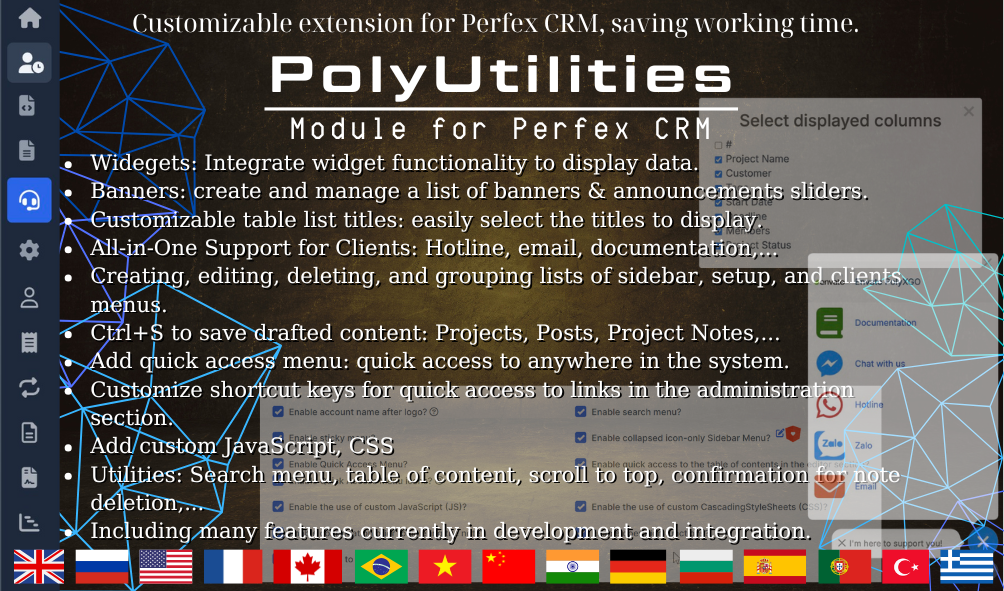
PolyUtilities là bộ giải pháp tùy biến giao diện và nâng cấp trải nghiệm người dùng (UI/UX) mạnh mẽ nhất dành cho Perfex CRM, giúp các agency thay đổi diện mạo hệ thống theo nhận diện thương hiệu riêng biệt.

Trình Quản Lý Theme Builder & Thương Hiệu Riêng

Cho phép khởi tạo nhiều mẫu giao diện Admin Theme, tùy chỉnh dải màu sắc (Sidebar, Topbar, Buttons), gán logo thương hiệu riêng, thay đổi favicon và tùy biến bản quyền chân trang cho khách hàng (White-label).

Tối Ưu Trải Nghiệm & Tiện Ích Mở Rộng

Tích hợp các tiện ích hữu ích như phím tắt nhanh, sắp xếp lại bố cục điều hướng, tùy chỉnh phông chữ hệ thống và tối ưu trải nghiệm làm việc mượt mà cho toàn bộ đội ngũ nhân sự.

Why are some modules, plugins, or products not available for direct purchase on the site?

For products sold outside the site - for example, polyxgo on Envato (CodeCanyon.net) - we are the exclusive authors under Envato’s platform. These products can only be sold and supported on Envato. Therefore, you cannot purchase them elsewhere if you wish to receive our official support and updates.

My Envato support period has expired. Can I still receive assistance?

Even if your support period has ended, we will still answer your current technical questions related to the module. However, for any requests that involve bug fixing, troubleshooting, integration, or hands-on assistance, you will need to renew your support first. We hope you understand this requirement. More details: https://help.market.envato.com/hc/en-us/articles/208191263-What-is-Item-Support

Can I get support if I only need to integrate some features from a module or plugin?

Yes. We handle feature integration based on customer requirements and descriptions. If a module has the features you need, you can send a separate request to polyxgo@gmail.com

How do I download and install the product?

You can download the product through the purchase receipt or your account dashboard right after you log in at https://headrandom.com/account/login. Installation steps are included in the documentation folder.

For products on Envato (Codecanyon) access the Download section after you log in.

Do you provide installation or setup support?

Yes, we provide basic installation and setup support for all purchased products.

Can I use the product on multiple sites?

Usage depends on the license type. Standard licenses typically allow one installation per purchase.

How do I receive updates after purchase?

Updates are delivered through your account dashboard or marketplace where you purchased the product.

What should I do if I encounter an error or conflict?

Please send us details, screenshots, and steps to reproduce the issue so our support team can assist you. You can create tickets on the system or email polyxgo@gmail.com.

How long does technical support last after purchase?

Support duration follows the policy of the marketplace or package you purchased, typically 6–12 months.

Do you provide documentation or a user guide?

Yes, all products include documentation to help you install and use the features. The data is connected to the system for each corresponding product project, and the documentation always provides the latest feature information and instructions from the project.

Can I request customization or additional features?

Yes, we offer custom development based on your requirements. For products sold exclusively and features already available on products listed on Envato, we integrate the additional features and update them through Envato. Only completely different features that require separate handling based on specific business workflows will be processed as a standalone service according to your detailed requirements.

Is there a demo site available for testing?

Yes, we provide a live demo so you can test features before purchasing.

How do I renew support after it expires?

You can renew support through your marketplace account or by contacting us directly.

What We're Working On

Added: "Brand & Themes" Module — A powerful engine to create, manage, and deploy custom Admin Themes for Perfex CRM core. (Jun 01, 2026) In Progress
Jun 01, 2026
Calculating...
Added: Theme Builder Manager — Create multiple theme templates, customize them independently, and instantly apply/switch between templates to overwrite the default Perfex CRM styles. (Jun 01, 2026) In Progress
Jun 01, 2026
Calculating...
Added: Layout & Component Positioning — Adjust and reposition structural UI components within the admin panel workspace to match your agency's preferred workflow. (Jun 01, 2026) Planned
Jun 01, 2026
Calculating...
Added: White-Label Corporate DNA Engine — Built explicitly for Agencies to brand the entire environment with custom logos, favicons, text macros, and personalized footer copyrights for clients. (Jun 02, 2026) Planned
Jun 02, 2026
Calculating...
Added: Color & Typography Customizer — Complete control over global color palettes (Sidebar, Topbar, Backgrounds, Buttons) and custom font styles/typography. (Jun 02, 2026) Planned
Jun 02, 2026
Calculating...

Recent Releases

v3.4.5 (28/05/2026)
NEW
-Standalone Media Manager for PolyUtilities. (May 9, 2026)
-Custom Login Page with Background Gallery (Fixed, Random, and Sequence rotation). (May 9, 2026)
-Visual Effects for Login Page (Rain, Code, Confetti, and FlowText). (May 9, 2026)
-Custom Login Info box with rich text editor and dynamic macros ({CURYEAR}, {BRAND}). (May 9, 2026)
-Added auto YouTube embed parsing for banners. (May 9, 2026)
CHANGED
-Improved Access Control UX: Redirects unauthorized users with a friendly alert instead of a blank error page. (May 9, 2026)
-Enhanced Custom Menus: Menu items are now automatically hidden if the user lacks permission to access them. (May 9, 2026)
-Improved Translations: Custom menu items now dynamically display accurate, pre-translated names from the system. (May 9, 2026)
-Optimized Icon Picker: Faster loading times and better performance when browsing icons. (May 9, 2026)
-Upgraded Login Page UI: Added real-time UI preview for styling, smooth glassmorphism effects, and optimized background image loading. (May 9, 2026)
-Improved Sidebar & Navigation UX: Better active tab highlighting, smoother scrolling, and seamless sticky topbar animations. (May 9, 2026)
-Enhanced Widget Builder with new Media, Gallery, and Youtube widgets, integrated Rich Text Editor and Media Manager, smoother drag-and-drop UX, dynamic widget count labels, and interactive help guides. (May 9, 2026)
FIXED
-Prevented redirect loops when the module is deactivated. (May 9, 2026)
-Fixed saving issues for the Custom Login Info editor. (May 9, 2026)
-Fixed sidebar menu losing its 'active' state in certain views. (May 9, 2026)
-Restored missing All-in-One Support icon on the admin login page. (May 9, 2026)
-Fixed popup and modal conflicts to ensure smooth interactions (e.g., Icon Selector, Tips & Guide). (May 9, 2026)
-Fixed inability to select text inside input fields of the Widget Builder. (May 9, 2026)
-Fixed minor UI shifting and visual glitches across the Media Manager and HTML Editor. (May 9, 2026)
-Ensured correct image aspect ratios in Widget displays. (May 9, 2026)
v3.4.4 (26/02/2026)
NEW
-Added new widget position "Article sidebar" for the Knowledge Base article detail page sidebar (Related Articles area). (February 25, 2026)
-Added admin edit button (pencil icon) on the frontend Knowledge Base article page. Visible only when an admin is logged in, clicking opens the admin article editor in a new tab. (February 25, 2026)
CHANGED
-Improved Table of Contents logic: Automatically hides when there are no headings, added state persistence (remembers collapsed/expanded state) per browser. (February 25, 2026)
-Refined Table of Contents scroll offset: Dynamically accounts for sticky editor toolbars to ensure headings are fully visible when clicked. (February 25, 2026)
FIXED
-Fixed Table of Contents not being hidden when article content has no headings. Also removes the floating toggle button. (February 25, 2026)
-Fixed Ctrl+S keyboard shortcut conflict with "Start Timer" functionality in header and dropdowns. Ensured Ctrl+S saves TinyMCE editor content before triggering form submission. (February 25, 2026)
v3.4.3 (30/11/2025)
FIXED
-Fixed issue where the page became blank due to migration Custom Menu. (November 30, 2025)
-Fixed issue where toggling active banner settings resulted in 400 error when setting default values for the first time. (November 30, 2025)
v3.4.2 (27/11/2025)
NEW
-Integrate fixed bottom menu (sticky bottom menu with 3-level menu items). Support unlimited menu items slider. Toggle on/off either or both on desktop, mobile.
-Add cache for Custom Menu processing + language keys.
CHANGED
-Persistent tab state in settings.
-Optimize menu sync performance with batch operations.
FIXED
-Fix query bug causing Custom Menu slow load and slowing system. Sincerely apologize to everyone with system affected by this bug!
-Fix issue where new menu items not added into database when module updates routes.
OTHER
-Support managing, categorizing, creating task template list for new project creation. This removes need to recreate generic tasks for most projects like gathering client requirements, feature lists, design, feature integration, handover, etc.
v3.4.1 (14/11/2025)
NEW
-Add settings to enable/disable Custom Menu, Multiple Companies, Multiple Addresses.
-Adjust checkbox style to a unified toggle button.
CHANGED
-Projects Name patterns: Add drag & drop support to reorder project name patterns. Remove pagination because the actual data is usually not large.
-Integrate settings that allow enabling or disabling features: Custom Menu, Multiple Companies, Multiple Addresses.
-Disable Gravatar support to avoid external avatar requests that slow down access to multiple companies and multiple addresses features.
FIXED
-Fix some issues related to the Project name pattern feedback.
-Fix conflict causing incorrect active state for menu items when adding custom styles css and scripts js.
-Issue where all menu items became active when the route removed the trailing slash after /admin.

Looking for full roadmap, documentation, or interactive release logs?

Explore Our Project Portal

Non-profit organizations, charities, and community initiatives supporting elderly people, children, people with disabilities, and other vulnerable groups are always welcome to reach out to us.

If your organization uses Perfex CRM and requires any of our modules, plugins, or related products, we will gladly provide assistance with installation, customization, training, and long-term operation.

As part of our commitment to supporting meaningful social impact projects, we offer lifetime free support for all products used by eligible non-profit organizations. Our goal is to help you streamline operations, reduce technology costs, and focus more resources on serving your community.

For inquiries and support, please contact us at polyxgo@gmail.com. We will do our best to assist your organization as quickly as possible.

This product is synced with Envato Market. You can view official customer feedback or write a review directly on Envato.
Rate & Review on Envato

Average Rating

4.9

Based on 13 ratings

Ratings Source Breakdown

Envato Market 4.9 ★ (13 ratings)
Local Website 0.0 ★ (0 reviews)
Merged Total 4.9 ★ (13 ratings)
This product is synced with Envato Market. You can view official customer discussions or leave a comment directly on Envato.
Comments on Envato

Loading reviews...

Sign in to continue

Please log in to leave a comment or review.

Or Log in using traditional account.
Purchased on Envato Market? Log in to sync your purchase or verify your license.